
A week on NTPSec
In which I find out with some certainty what time it is.
The ntpd utility can synchronize time to a theoretical precision of about 232 picoseconds. In practice, this limit is unattainable due to quantum limits on the clock speed of ballistic-electron logic.
(https://docs.ntpsec.org/latest/ntpd.html)
I always assumed I was using ntpd to keep time on my linux computer. But I was only sort of right.
According to the Debian Wiki, since Debian 12, the default NTP client is
systemd-timesyncd. It uses SNTP (Simple Network Time Protocol), which
implements the client with no option to host a time server, and it sets the time
roughly by communicating with a single time server. There’s no recourse if you
get a bad server, or “falseticker” in NTP parlance.
There are a few implementations of NTP to choose from. The systemd-timesyncd
daemon is a basic client suitable for keeping time. The original NTP reference
implementation is ntpd, which is still around, but is deprecated on Debian in
favor of the more security-focused NTPSec. And then
Chrony is a newer implementation that is more
practical than ntpd. It looks like a darn fine timekeeper by
comparison.
There are interesting things to say about each NTP tool (and their apparent
controversies),
but if you’re interested in NTP you can pick pretty equally among ntpd,
Chrony, and NTPSec. I’ve been playing with NTPSec for its debugging utilities
like out-of-the-box data visualizations using ntpviz.
Most computers have a real time clock in hardware and a system clock in
software. On powerup or reboot, the system clock is set using the RTC. You can
use a command like date to set the date/time, but this only updates the system
clock; strictly speaking to update the hardware clock immediately you’ll need
hwclock --systohc
The hardware clock is battery-driven, which is how its time reading persists across boots. But some parts of it are curiously system-dependent, for example whether the hardware clock is set in UTC or local time.
If your machine dual boots Windows and Linux, then you could have problems because Windows uses localtime for the hardware clock; while Linux and Debian use UTC for the hardware clock. In this case you have two choices. The first is to use localtime for the hardware clock, and set Debian to use localtime. The second is to use UTC for the hardware clock, and set Windows to use UTC.
https://wiki.debian.org/DateTime
NTP implementations like Chrony and NTPSec don’t directly interact with the RTC; instead, they modify the system clock. They tend to make use of a kernel feature called “11-minute mode”, where the system clock syncs to the hardware clock every 11 minutes, but documentation on this is a bit scant. Some comments in the Chrony docs.
Real time clocks are usually crystal oscillators with a frequency of 32.768 kHz, and since NTP doesn’t directly interact with them, I’m not going to talk much more about them.
Software clocks on the other hand are crucial to the system. Every system that
NTP runs on must provide a time correction service. The adjtime syscall is
intended to be portable. As far as I’ve seen, it’s POSIX standard. You might
also see adjtimex, which is a Linux-specific variant.
To explain how the system call works, The Design and Implementation of the FreeBSD Operating System:
The
settimeofdaysystem call will result in time running backward on machines whose clocks were fast. Time running backward can confuse user programs (such asmake) that expect time to invariably increase. To avoid this problem, the system provides theadjtimesystem call [Mills, 1992]. Theadjtimesystem call takes a time delta (either positive or negative) and changes the rate at which time advances by 10 percent, faster or slower, until the time has been corrected. The operating system does the speedup by incrementing the global time by 1100 microseconds for each tick and does the slowdown by incrementing the global time by 900 microseconds for each tick. Regardless, time increases monotonically, and user processes depending on the ordering of file-modification times are not affected. However, time changes that take tens of seconds to adjust will affect programs that are measuring time intervals by using repeated calls to gettimeofday
The Mills reference is to RFC 1305.
Since I have TDAIOTFBSDOS open already, I can mention a few other things about a typical POSIX software clock works. The system software clock is created through an interrupt timer, and the system “increments its global time variable by an amount equal to the number of microseconds per tick. For the PC, running at 1000 ticks per second, each tick represents 1000 microseconds,” (p. 73). And if you think 1000 interrupts per second is a lot of interruption, you’re right. “To reduce the interrupt load, the kernel computes the number of ticks in the future at which an action may need to be taken. It then schedules the next clock interrupt to occur at that time. Thus, clock interrupts typically occur much less frequently than the 1000 ticks-per-second rate implies,” (pp. 65-66).
I’d guess (and a brief conversation with ChatGPT seems to confirm) that modern operating systems have heavily optimized this part of their timekeeping. After all, who cares what time it is if no process is trying to observe it?
There is not one way of measuring time more true than another; that which is generally adopted is only more convenient.
Henri Poincaré
What would it take for me to serve time to others? NTP servers listen on port 123 and usually work only over UDP, so I suppose the simple way to serve time is to start ntpd in server mode, start listening, and configure someone to ask you the time. But if you really want to be seen, you have to join the pool.
The pool.ntp.org project is a big virtual cluster of timeservers providing reliable, easy to use NTP service for millions of clients.
The pool is being used by hundreds of millions of systems around the world. It’s the default “time server” for most of the major Linux distributions and many networked appliances (see information for vendors).
https://www.ntppool.org/en/
There’s very clear documentation on how to join the pool, too. The basic steps are:
- Get your own time from a known good source (not the pool).
- Configure a stable IP address (trickier than you might think – even if you set up port forwarding to get around DHCP issues, your ISP tends to rotate your public IP address as it wants).
- Be willing to make a long-term commitment to the project.
I’ll put “create a home time server” on my list of things to try, but joining the pool would probably create too big a wave.
My computer may not be the best to ask for the precise time. Where does authority in timekeeping come from? Who has the time? I’m only an hour’s drive away from the National Clock and Watch Museum, and after visit and a few dozen hours of followup research, I have something approximating an answer.
We get our sense of time from the periodic movements of the starry firmament – the sun, the moon, the stars. And our bodies, along with most organisms on Earth, have built-in timers that encourage us to do those activities that keep us alive. This is when you usually sleep, this is when you usually eat. As different cultures sought to understand the heavens and their perfection, timekeeping began to occupy its modern central role for coordination in our lives.
And so at the moment my interest in timekeeping isn’t how we developed precision clocks, but how we managed to coordinate ourselves using those clocks. Why we coordinate ourselves using those clocks. What even is a clock? If all of the atomic clocks in the world stopped ticking for 10 minutes, would we be able to recover “the time”?
We’ve had a sense for calendars for a long time. “By the 14th century BC the Shang Chinese had established the solar year as 365.25 days and the lunar month as 29.5 days,” (RFC 1305). By 432 BC, the Greek astronomer Meton had estimated the lunar month – the time it takes for the moon to circle the earth – to within about 2 minutes of the currently understood value.
Time-curious cultures became duly obsessed with the frequency and stability of our cosmic oscillators. The Earth’s rotation and its orbit around the sun, the moon’s orbit around the Earth. And each culture had a calendar that tried to match the motions of the cosmos with a predictable and convenient “civilian” calendar.
Not all cultures had a calendar, and the ones that did used different systems, so the process of dating events is knotty. Suffice to say that it involves some guesswork. The best case for understanding the orders of events in the old days is having what Mills calls (in RFC 1305) “an accurate count of the days relative to some globally alarming event, such as a comet passage or supernova explosion.”
And so calendars are social. The civil calendar had to be convenient and fit into the activities of daily life, and ordering of events depends on some collective consciousness around global events. I’ve been surprised by how often we make clocks and calendars fit into daily life and not the other way around. Several of the most precise modern timescales today are based on what feels right and looks right, made a bit more precise.
Calendars order our years; clocks order our days. Early religion temporalized daily life by requiring certain religious acts to be done multiple times a day. Some of the earliest interesting clock-like devices we have are from monasteries that rang bells at specific times. (And the word clock is derived from the French word for bell.) This went on for a few hundred years.
The next advance was periodic timekeepers. Time used to be more organic than it is today. Hours were not equally sized, and the day was not split equally into 24 parts. But somewhere, at some time, Europeans made an intuitive leap from continuous time devices like the clepsydra or the procession of different stars and planets to discrete time – time as ticks1. In Revolution in Time, David Landes considers this one of the great methodological leaps in western civilization. It took other cultures another 500 years to begin using oscillating, periodic timekeepers.
Clocks have their social uses. Nearly as soon as clocks became convenient and domestic, punctuality became an important social cue. And as life became more connected with trade, trains, and radio, the pragmatic importance of clocks only increased.
I installed NTPSec on my Debian machine and left the configuration mostly as-is.
sudo apt-get update && sudo apt-get install ntpsec ntpsec-doc ntpsec-ntpviz
I made sure to enable statistics, because I’m really after visualizations. I
want to see the thing do stuff. Visualizations are generated using ntpviz,
which is scantily documented (this was helpful but ancient:
ntpvis-intro), but I
found enough to get me going. Unfortunately, I just set up my daemon, and
there’s no data to visualize. I took the opportunity to do some background work
on the metrics.
Clocks are never perfectly in sync, and the most important contributor to incorrect timekeeping is a difference in oscillator frequencies. This is called frequency skew. If the “correct” time is an oscillator at 1000 Hz, my local computer clock might be more like 1001 Hz or 999 Hz. So even if I set my clock to the right time, I would gain or lose some seconds every day.
Frequency skew is measured in parts per million, which is to say the number of periods fast or slow per million oscillations. In the 1000 Hz example, 1001 Hz would have a skew of 1 part in every thousand, or 1000 parts per million (ppm). 999 Hz has a skew of -1000 ppm.
Skew is also described in other ways. A human-friendly way to describe it is “seconds gained or lost per day”, or week or year. This gives you the number in practical terms. It’s a bit tricky to translate between them, though, considering the gap between oscillation frequency and length of a day.
Your skew might also vary over time, and this is called drift.
NTP corrects for skew as part of the protocol by nudging the time and doing its best to predict changes. Skew is affected by the quality of the hardware and the environment around the oscillator, especially temperature. For ideal timekeeping, you’ll want to keep your computer in a nice climate-controlled vault with excellent heat sinking.
The clock offset is the estimated difference between my clock and the reference clock, measured in milliseconds. I show roughly how this is calculated in NTP in 30 Seconds. In short, it’s calculated by estimating the latency between you and the server and using that to guess what time the server received your request. Then you compare your guess (based on local time + latency) to what the server reported was the “actual” time it received the request, and use the difference to work out how wrong your clock is.
Practically speaking, for general monitoring, you can use ntpmon. This is a
top-like tool for watching your NTP daemon interact with peers. The output
looks something like this:
     remote           refid      st t when poll reach   delay   offset   jitter
 0.debian.pool.n .POOL.          16 p    -   64    0   0.0000   0.0000   0.0001
 1.debian.pool.n .POOL.          16 p    -   64    0   0.0000   0.0000   0.0001
 2.debian.pool.n .POOL.          16 p    -   64    0   0.0000   0.0000   0.0001
 3.debian.pool.n .POOL.          16 p    -   64    0   0.0000   0.0000   0.0001
-ip74-208-14-149 192.58.120.8     2 u  598 1024  377  41.7645   0.9319   1.5714
-144.202.66.214. 162.159.200.1    4 u  834 1024  377  45.3224   1.1844   1.2529
*nyc2.us.ntp.li  17.253.2.37      2 u  564 1024  377  10.2534  -0.8732   0.8516
+ntp-62b.lbl.gov 128.3.133.141    2 u  748 1024  377  73.6187  -0.3344   1.0547
+time.cloudflare 10.102.8.4       3 u  212 1024  377   8.4884   0.0523   0.9331
 192-184-140-112 .PHC0.           1 u  66h 1024    0  85.8202   5.3690   0.0000
+ntp.nyc.icanbwe 69.180.17.124    2 u  639 1024  377  11.8765  -0.1314   1.1134

ntpd ntpsec-1.2.2                             Updated: 2026-02-04T08:17:40 (32)

 lstint avgint rstr r m v  count    score   drop rport remote address
      0   1284    0 . 6 2    321    1.217      0 51529 localhost
    212   1054   c0 . 4 4    127    0.050      0   123 time.cloudflare.com
    564   1079   c0 . 4 4    123    0.050      0   123 nyc2.us.ntp.li
    598   1058   c0 . 4 4    126    0.050      0   123 ip74-208-14-149.pbiaas.com
    639   1066   c0 . 4 4    125    0.050      0   123 ntp.nyc.icanbwell.com
    748   1055   c0 . 4 4    126    0.050      0   123 ntp-62b.lbl.gov
    834   1066   c0 . 4 4    125    0.050      0   123 144.202.66.214 (144.202.66.214.vultruser
I’ll describe peer metrics in a second. For now, the second table, starting with
lstint, is the MRU list (MRU=most recently used). Here are the stats it
reports.
lstintInterval (s) between receipt of most recent packet from this address and completion of the retrieval of the MRU list by ntpq.avgintAverage interval (s) between packets from this address.rstrRestriction flags.rRate control indicator.mPacket modevPacket version number.countPackets receivedscorePackets per second (averaged with exponential decay)dropPackets droppedrportSource port of last packet receivedremote addressThe remote host name
There are commands you can use to change the output, like d for detailed mode.
For a snapshot, you can use ntpq, a helpful tool for inspecting the daemon. It
has an interactive mode and a one-shot mode. This queries peers in the one-shot
mode.
$ ntpq --peers --units
     remote                                   refid      st t when poll reach   delay   offset   jitter
=======================================================================================================
 0.debian.pool.ntp.org                   .POOL.          16 p    -   64    0      0ns      0ns    119ns
 1.debian.pool.ntp.org                   .POOL.          16 p    -   64    0      0ns      0ns    119ns
 2.debian.pool.ntp.org                   .POOL.          16 p    -   64    0      0ns      0ns    119ns
 3.debian.pool.ntp.org                   .POOL.          16 p    -   64    0      0ns      0ns    119ns
-ip74-208-14-149.pbiaas.com              192.58.120.8     2 u  671 1024  377 41.765ms 931.92us 1.5714ms
-144.202.66.214.vultrusercontent.com     162.159.200.1    4 u  907 1024  377 45.322ms 1.1844ms 1.2529ms
*nyc2.us.ntp.li                          17.253.2.37      2 u  637 1024  377 10.253ms -873.2us 851.60us
+ntp-62b.lbl.gov                         128.3.133.141    2 u  821 1024  377 73.619ms -334.4us 1.0547ms
+time.cloudflare.com                     10.102.8.4       3 u  285 1024  377 8.4884ms 52.298us 933.07us
 192-184-140-112.fiber.dynamic.sonic.net .PHC0.           1 u  66h 1024    0 85.820ms 5.3690ms      0ns
+ntp.nyc.icanbwell.com                   69.180.17.124    2 u  712 1024  377 11.877ms -131.4us 1.1134ms
Here’s how this table is interpreted according to the ntpmon man page:
tally(symbol next to remote) One ofspace: not valid, x, ., -: discarded for various reasons, +: included by the combine algorithm, #: backup, *: system peer, 0: PPS peer. Basically, look for the*and any+signs to see who you’re listening to right now.remoteThe host name of the time server.refidThe RefID identifies the specific upstream time source a server is using. In other words, it names the reference clock (stratum 0 or 1), even if this server is just repeating what that reference clock says.stNTP stratumtType. u: unicast or manycase, l: local, s: symmetric (peer), server, B: broadcast server.whensec/min/hr since last received packet.pollPoll interval in log2 secondsreachOctal triplet. Represents the last 8 attempts to reach the server.377is binary11111111, which means all 8 attempts reached the server. A value like326is binary11010110, meaning out of the last 8 attempts, the 3rd, 5th, and 8th attempts failed.delayRoundtrip delayoffsetOffset of server relative to this host.jitterJitter is random noise relative to the standard timescale.
For more complete definitions, see man ntpmon.
Many of these are technical and mostly of interest to those already experienced
with NTP. I’m not, so I’ve focused on a few of the more interesting metrics:
tally, reach, delay, offset, and jitter. These are the same metrics that
ntpviz reports on.
There is a law of error that may be stated as follows: small errors do not matter until large errors are removed. So with the history of time measurement: each improvement in the performance of clocks and watches posed a new challenge by bringing to the fore problems that had previously been relatively small enough to be neglected.
Revolution in Time p. 114
For a long time, agreement between clocks didn’t matter. Citizens of the US in the 19th century had timekeepers, but they set them using “apparent solar time”, or time estimated by when the sun is highest in the sky. This varies across any distance east or west, so my clock’s noon in Pennsylvania was noticeably different from my cousin’s clock in Pittsburgh. Apparant solar time is set by sundial, and astronomers could keep time better still by looking at the movements of the planets and stars. (But who had an astronomer in those days?) Besides the sun, you had church bells and tower clocks. Ye old tower clock in most cases was set by sundial, and “none too accurately” in the words of the clock museum. Religious clocks were more of a suggestion of the time.
Coordination wasn’t a moral imperative in the US until the railroads. When you’re coordinating a few hundred trains in and out of stations, timekeeping becomes quite important. For most of the 19th century, each railroad company had its own timekeeping system and standards for accuracy. This created competing definitions of time, and confusion and accidents followed. In the middle of the century, there were 144 official time zones in North America alone2.
The accidents and fatalities motivated the US to move to a new definition of standard time based on only four main timezones, the same basic ones we use today.
If you’re like me, you get nervous thinking about the logistics of suddenly changing the time, but while the topic of changing from “God’s time” to an official time was controversial, the actual change seems to have gone well. There was a day of two noons on November 18, 1883, and official clocks and watches were set to the correct time via telegraph. And that was it.
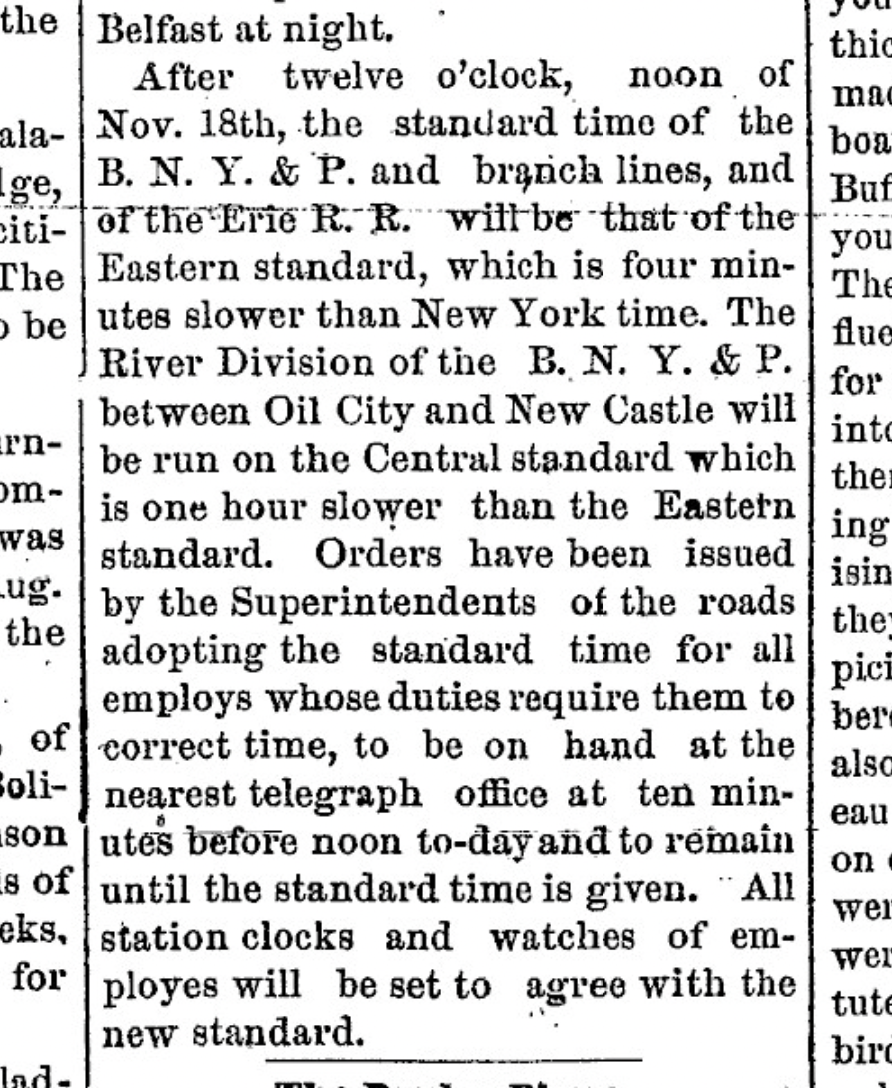
Source: https://www.nyshistoricnewspapers.org
After a day or two, I checked back in on my NTP stats to see what I’d collected.
For my distribution, the data collects in /var/log/ntpsec/. Running ntpviz
on this folder will generate an HTML report with all of the default data
visualizations.
nptviz -d /var/log/ntpsec/
open ntpgraphs/index.html
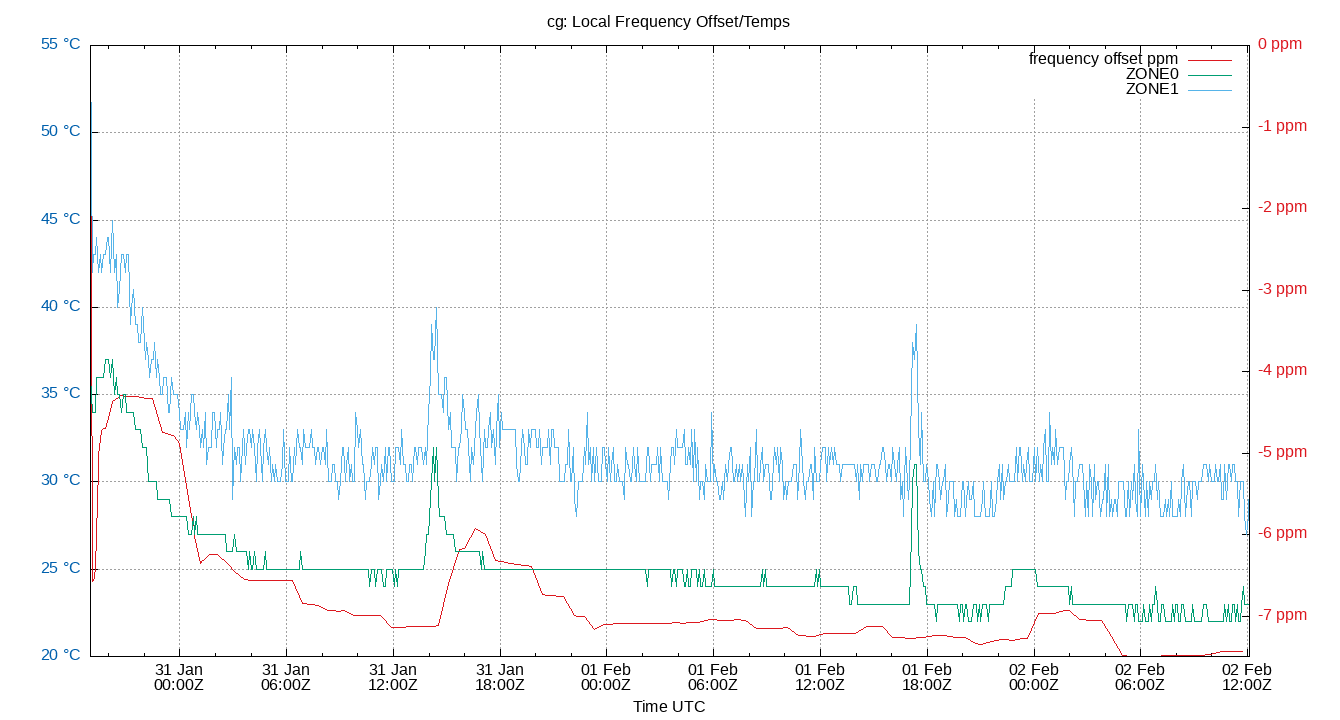
The interesting graph for me is the first one, which plots clock offset (ms, left axis) and frequency skew (ppm, right axis). My clock is slow, pretty consistently, by about 7ppm. That is, over 1 million oscillations, my clock will read 7 periods less than the authority. As long as this is consistent, that’s ok.
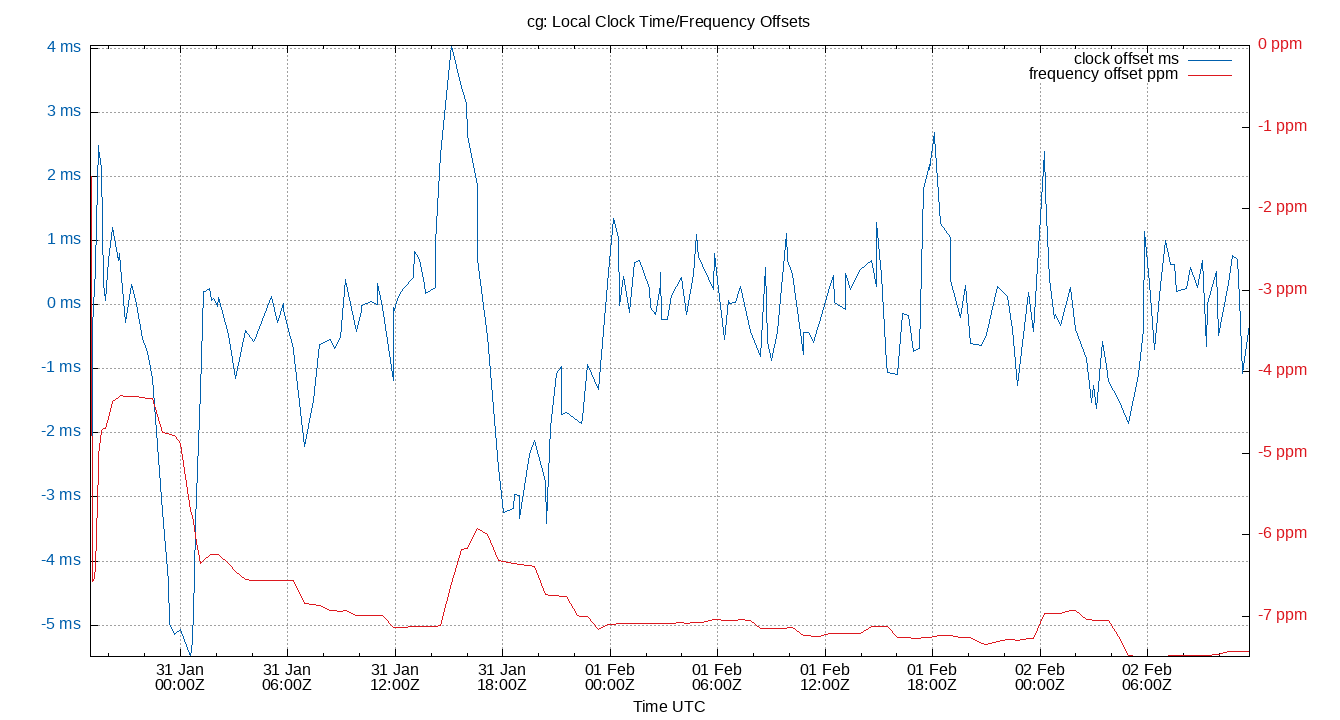
At some point on Jan 31, I suddenly found myself 4ms ahead of the reference clock, and the ensuing correction was a bit too big. But the last day or two has been very stable.
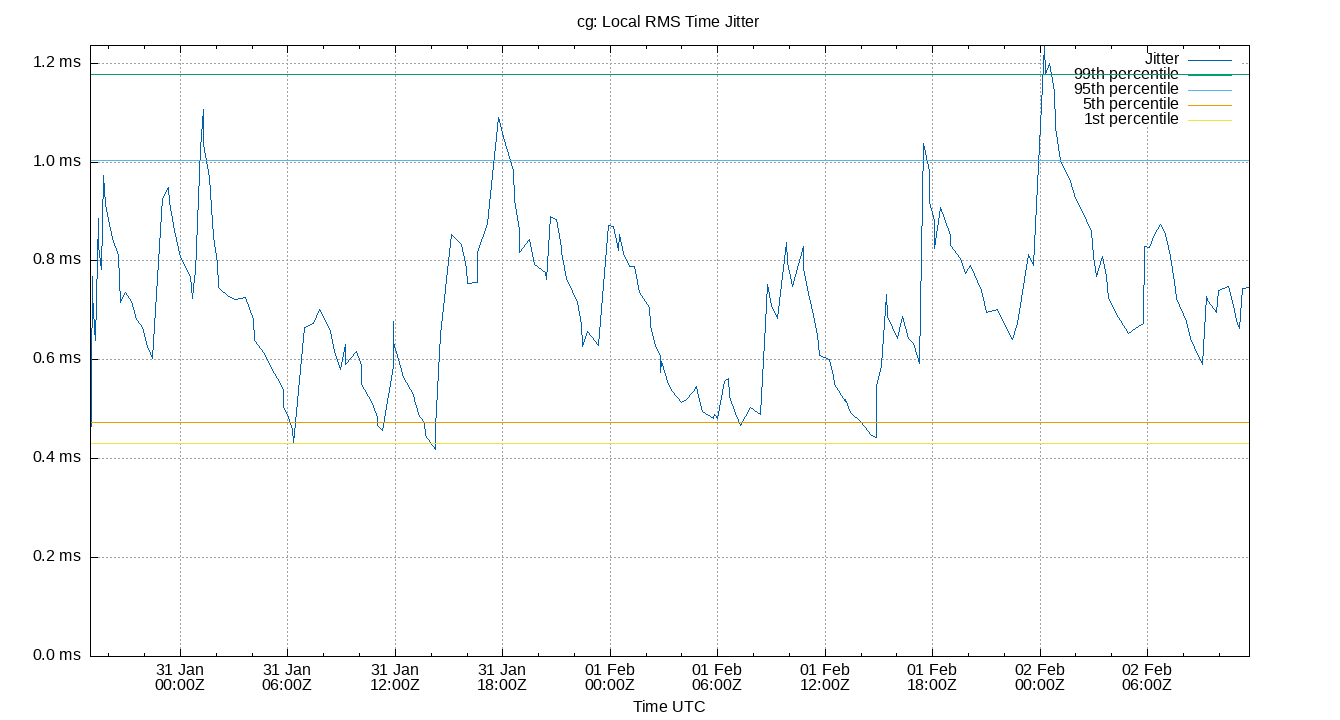
The next graph shows “RMS time jitter” (RMS=root mean square), or in other words “how fast the local clock offset is changing.” The tip under the graph says that 0 is ideal, but it doesn’t give me a sense of whether my clock with a 90% range of 0.528 is any good. It seems spiky.
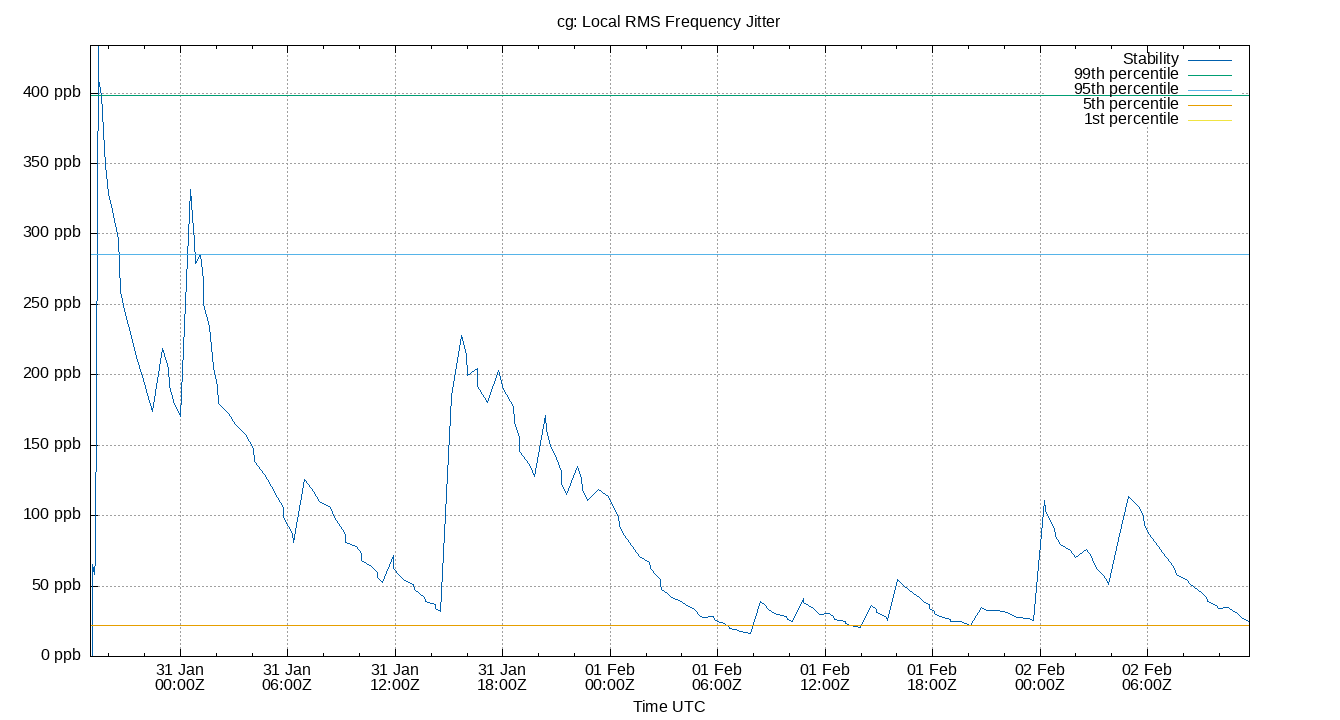
And a third graph shows RMS frequency jitter, similar metric but for my oscillator’s consistency.
Skipping down a bit, there’s a fun correlation graph between local temperature and the frequency offset. My computer apparently measures temperature in two different places (one consistently warmer than the other). You can see how sudden changes in temperature correlate closely with changes in the frequency offset. The spikes are caused by the space heater in my office.
All of this is still abstract to me. I’ll have to collect more data and try it on a few different machines until I get a better sense for what’s good and what’s not.
Ok, it’s time time got defined.
To define the time, you need a few things:
- An oscillator
- A count of oscillations (the “epoch”)
- An origin
An oscillator with a counter is called a clock, and the origin is called the “frame of reference.” If you consider Earth’s rotations as an oscillator, then the “day” is the counter, where “day” is a complete rotation of the Earth. The origin can be anything convenient, maybe the oscillation when Halley’s comet last passed overhead, or a particular spring equinox. A particular clock is called a timescale.
Before 1958, the heavenly bodies defined the common timescale. The second was defined as 1/86,400 of a solar day, which is the average time between apparent noon at some standard location, like the Royal Observatory in Greenwich. There are all kinds of quirks with this. First, days are getting longer, because the Earth’s rotation is slowing down. It’s esimated that several hundred million years ago, there were only 20 hours in the day. This is caused by the friction of tides.
Second, there are variations in the rotation for other reasons. It’s not a stable oscillator, and the Earth’s tilt varies over time, which causes other inconsistencies. It turns out that this timescale is still useful in modern timekeeping (it’s a component of Greenwhich Mean Time), but it’s not an effective standard for the SI second.
“In 1958, the standard second was redefined as 1/31,556,925.9747 of the tropical year that began this century,” (RFC 1305). The tropical year is the time the Sun takes to return to the same position in the sky from some perspective on Earth. This only lasted until 1967, because it was still not precise enough for modern needs. The tropical year has an accuracy of only 50 ms and increases by 5ms per year.
In 1967, the second was redefined using ground state transitions of the cesium-133 atom, in particular 1 second = 9,192,631,770 periods. Since 1972, “time” has had a foundation of International Atomic Time (TAI), which is defined using the cesium state transition timescale alone. This is a very important time standard – it underlies UTC, for example.
TAI is a continuous average count of standard atomic seconds since 1958-01-01 00:00:00 TAI. You might say, “Hey, that’s defined in terms of TAI,” and yeah, I was wondering about that myself. To understand the origin of TAI, you have to understand the standard Modified Julian Date (MJD). There’s no space here for that, but in essence, it’s a more precise version of our intuitive understanding of a calendar of recent events. Historical dates are vague, but modern dates are well tracked. In other words, the origin is determined from well-known atronomical observations.
There are a lot of standards (UT, UT0, UT1, UT2, TAI, GMT, UTC) and I don’t have the space or knowledge to dismbiguate them all. But I want to answer one of the questions that started this history hunt. What’s the difference between UTC and GMT?
Coordinated Universal Time and Greenwhich Mean Time. The former is a variant of TAI that occasionally inserts leap seconds in order to stay in step with GMT. GMT is mean solar time (also known as local mean time) at the Royal Observatory in Greenwhich, London.
UTC stays in step with GMT through leap seconds, which are inserted/deleted when the difference between GMT and UTC approaches 0.7 seconds. These leap seconds make UTC a non-continuous timescale. TAI on the other hand is continuous – there are no leap seconds (UTC = TAI - leap seconds). TAI will continue to drift out of sync with our intuition for “the time” based on the orbital oscillations, but UTC, like so much of timekeeping, is social. Great pains have been taken to make it precise but intuitive.
And I can also answer the question I mentioned above, What would happen if the atomic clocks on Earth stopped for 10 minutes?3 When I posed the question, I imagined a server with a red segmented display keeping the time somewhere in a vault. But now I know that the cesium atom transitions define the second, not the time. The agreed-upon time is just that, agreed upon. If the frequency reference stops working, the time servers of the world would no longer receive a signal telling them if they’re on the standard or not. They might drift by picoseconds in 10 minutes, but not enough to cause catastrophe. And the frequency standard can be recovered by restarting the cesium atom state transitions – the clocks of the world would come once again to agree.
The point of all of this is that “the time” is not much more complicated than “whatever we say it is.” As Poincaré said in the quote above, the true time is the one that’s most convenient.
My NTP server has been keeping time for me for a week now while I researched this piece. All week I’ve been hunting for this idea of “the actual time” separate from how I intuitively understood it.4
But even though we took one step away from natural time by embracing averages over daily observations, we’ve taken a step back towards nature with UTC, which has been jumping through hoops (or at least seconds) to keep civil time convenient.
In the end, we all have the time. “The time” is a social construct, an event of the collective conscious, the one thing we can agree on because it was our agreement that defined it in the first place.
Sources
- https://linux.die.net/sag/hw-sw-clocks.html
- https://wiki.debian.org/DateTime
- https://ntpsec.org
- https://wiki.archlinux.org/title/Systemd-timesyncd
- The National Watch and Clock Museum in Columbia, PA
- Revolution in Time, David S. Landes, 1e
- What is Time?, G. J. Whitrow
- The Design and Implementation of the FreeBSD Operating System, 2e
- RFC 1305, especially Appendix E: The NTP Timescale and its Chronometry.
- https://www.nist.gov/pml/time-and-frequency-division/popular-links/walk-through-time/walk-through-time-atomic-age-time
- https://www.nist.gov/pml/time-and-frequency-division/popular-links/walk-through-time/walk-through-time-world-time-scales
- https://guides.loc.gov/this-month-in-business-history/november/day-of-two-noons
- https://www.nyshistoricnewspapers.org
Other notes
There’s much more to say about this topic, much more research I couldn’t include here. A sampling of other interesting topics.
- How time is kept in distributed systems and Lamport’s article on clocks
- Special relativity and the meaning and relativity of the simultaneity of events
- Why your garden sundial doesn’t work (and how to fix it)
- Scams and scandals of US timekeeping authorities, who made a killing off of giving preferential treatment to some watchmakers and not others
- Daylight savings time and the madness of crowds
- This whole Tom Scott video and how computers deal with calendars
Maybe some other day.
-
Escapements convert potential energy like a falling weight suspended by a rope into periodic motion, such as the ticking of a hand. There’s no better visualization of the development of the clock than Bartosz Ciechanowski’s mechanical watch. And while these escapements were crude in the beginning, it took only a few breakthroughs until they were able to tell time within a few seconds per day. ↩
-
How do you get 144 time zones? Any move along a line of latitude (i.e. east or west) causes the sun’s apparent apex to move. When the sun is highest in the sky in Pennsylvania, it’s still rising in Colorado. Your sundial would in that case create infinite time zones for each variation in longitude. The railroads “solved” this by using a standard time for each major city they stopped in. You got a sort of “average solar time” for this stretch of railroad. ↩
-
In fact, an NIST atomic clock did recently stop. ↩
-
I haven’t struggled alone. Sundials used to come with an equation of time guide that translated the apparent solar time to the current mechanical (“mean”), so the purchaser could know with confidence what the “actual” time is. In the words of David Landes, “instead of setting by the sun, people corrected the sun.” Though I should mention that there were also equation clocks, which used complicated mechanisms to convert from mean time to apparent solar time. ↩