
Optimizing TSV Repair in Python
This TSV file has a problem:
id	name	comment	score
0	charlie	normal	20
1	alice	this is a
multiline comment	10
2	bob	normal	8
There’s an unquoted multi-line field on the second line. I’m not aware of a TSV parser that can correctly parse this – most consider it an invalid file, some NULL-fill the remaining fields on any line that has incomplete data.
I regularly ingest data from a particular data source that has this bad feature in it, and the problem has gotten worse recently. I’ve decided to fix it. The question is, “What’s the best way to fix unquoted newline characters?”
I created this repository with my results and some tooling for benchmarking and profiling: https://github.com/charlie-gallagher/tsv-repair
Problem statement
Like the Billion Row Challenge, the goal is to process large files as quickly as possible using some base programming language.1 In my case, I worked in base Python 3.13 on MacOS.
Using pure python (stdlib), repair a large (10GB), utf-8 encoded TSV file with a knowable number of fields by (a) identifying incomplete lines, (b) combining successive incomplete lines until they form a complete line, and (c) not combining lines if the result is a row with too many fields. A single row may have one or more newlines, i.e. a row might be spread across one or more lines of the file. The lines that form a row are always ordered correctly, successive and contiguous. Newlines are LF only, not CRLF. To find the number of fields, you can read the first line, which is always the header.
To make things simpler, even if a field is quoted, you can still join successive split lines.
In the end, the file should look like this:
id	name	comment	score
0	charlie	normal	20
1	alice	this is a multiline comment	10
2	bob	normal	8
i.e. replace the newline character with a space. If there are multiple newline
characters in a row (hello\n\nworld), replace each one with a space. If a
field starts or ends with a newline, you can still replace newlines with a
space.
Basic solution
Here’s a straightforward solution I came up with that passes all the tests.
There are one or two inelegancies, like the _need_to_write variable that keeps
track of some state information, but it does the thing.
def repair(input_file: str, output_file: str) -> None:
    with open(input_file, "r") as fin, open(output_file, "w") as fout:
        # Start by copying header
        header = fin.readline()
        fout.write(header)

        expected_tabs = header.count("\t")

        # Then, iterate over the lines, repairing as you go
        while True:
            line = fin.readline()
            if not line:
                break
            line_tabs = line.count("\t")
            if line_tabs == expected_tabs:
                fout.write(line)
                continue

            # Line repair
            # Grab next line and see if it complements
            _need_to_write = True
            while line_tabs < expected_tabs:
                continuation_line = fin.readline()
                if not continuation_line:
                    break
                cline_tabs = continuation_line.count("\t")
                if line_tabs + cline_tabs <= expected_tabs:
                    line = line.rstrip("\n") + " " + continuation_line
                    line_tabs += cline_tabs
                else:
                    # Adding these lines would create a row with
                    # too many fields
                    fout.write(line)
                    fout.write(continuation_line)
                    _need_to_write = False
                    break
            if _need_to_write:
                fout.write(line)
And huzzah, the tests are passing.
❯ python3 -c "from test_repair import main; from repair_basic import repair; main(repair)"
Testing repair function against golden files in /Users/charlie/tsv-repair/test_files

  PASS  already_good.tsv
  PASS  basic.tsv
  PASS  basic_incomplete_first_line.tsv
  PASS  basic_incomplete_last_line.tsv
  PASS  multi_newline.tsv
  PASS  newline_as_first_char_in_field.tsv
  PASS  newline_as_last_char_in_field.tsv
  PASS  newline_as_only_char_in_field.tsv
  PASS  partial_solution.tsv
  PASS  partial_solution_2x.tsv
  PASS  quoted.tsv
  PASS  too_many_tabs.tsv
  PASS  two_bad_lines_in_a_row.tsv

13/13 tests passed.
Benchmark on large file:
2026-03-13 09:59:03 repair_basic 14.604409
The large file configuration for this run was: 1M rows, 120 columns, and 0.002 likelihood that a cell contains a newline character. The file was 3.0 GB. You can generate a similar file using:
python generate_large_file.py -r 1000000 -c 120 --newline-likelihood 0.002
There’s a cProfile script as well. Here’s the output:
❯ python3 profile_repair.py repair_basic.py
Profiling repair_basic on large_file.tsv...

--- Top 30 hotspots (sort: cumulative) ---

         4882830 function calls in 20.516 seconds

   Ordered by: cumulative time

   ncalls  tottime  percall  cumtime  percall filename:lineno(function)
        1    1.674    1.674   20.516   20.516 /Users/charlie/tsv-repair/repair_basic.py:2(repair)
  1000001    8.711    0.000    8.711    0.000 {method 'write' of '_io.TextIOWrapper' objects}
  1237862    5.031    0.000    6.102    0.000 {method 'readline' of '_io.TextIOWrapper' objects}
  1237861    3.800    0.000    3.800    0.000 {method 'count' of 'str' objects}
   389745    0.358    0.000    0.979    0.000 <frozen codecs>:322(decode)
   389745    0.621    0.000    0.621    0.000 {built-in method _codecs.utf_8_decode}
   237860    0.136    0.000    0.136    0.000 {method 'rstrip' of 'str' objects}
        2    0.093    0.047    0.093    0.047 {built-in method _io.open}
   389745    0.093    0.000    0.093    0.000 <frozen codecs>:334(getstate)
        2    0.000    0.000    0.000    0.000 {method '__exit__' of '_io._IOBase' objects}
        1    0.000    0.000    0.000    0.000 {method 'disable' of '_lsprof.Profiler' objects}
        1    0.000    0.000    0.000    0.000 <frozen codecs>:312(__init__)
        1    0.000    0.000    0.000    0.000 <frozen codecs>:189(__init__)
        2    0.000    0.000    0.000    0.000 /Users/charlie/.pyenv/versions/3.13.8/lib/python3.13/pathlib/_local.py:227(__str__)
        1    0.000    0.000    0.000    0.000 <frozen codecs>:263(__init__)
Most time was spent reading and writing, followed by counting tab characters. This is pretty much as you expect. This is an I/O bound program with some amount of calculation. Out of 20 seconds, 14s were spent on I/O. The other top hotspots were:
- Decoding utf-8 (0.98s)
- Removing newline characters with rstrip (0.14s)
Optimizations
A good optimization would be to not write this in Python at all, but let’s ignore that and assume we have to work in pure cPython. There are plenty of optimizations we can reach for – some make more sense for an I/O-bound program and others are more appropriate for a CPU-bound program. Scanning the files is I/O-bound and fixing tabs involves an amount of CPU work, so it’s worth checking both.
- We can count tabs without decoding utf-8
- Buffer writes
- Buffer reads
- Avoid copying and doing extra work
- Multiprocessing
- Memory map the file
- PyPy
Avoiding utf-8 decoding
The file is encoded in utf-8, which has the nice property that any ACII byte
uniquely identifies that ACII character. If you’re interested in finding tabs
\t (0x09), utf-8 ensures that no matter how many multi-byte characters you
have, none of them will contain this byte. In utf-8 multi-byte characters, the
largest bit is always set. So no multi-byte character can contain 0x09, where
the largest bit is unset.
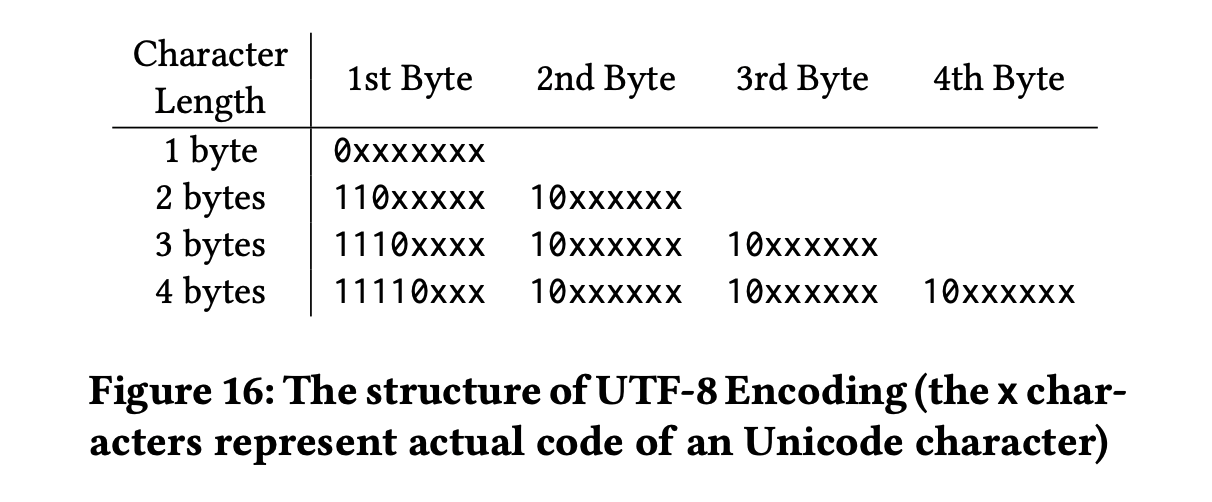
Source: https://badrish.net/papers/dp-sigmod19.pdf
That means we can do away with decoding the bytes and just search for 0x09, or
in Python b"\t".
Here’s the diff with repair_basic.py.
❯ diff -u repair_basic.py repair_bytes.py
--- repair_basic.py     2026-03-12 16:42:34
+++ repair_bytes.py     2026-03-13 10:27:08
@@ -1,18 +1,18 @@

 def repair(input_file: str, output_file: str) -> None:
-    with open(input_file, "r") as fin, open(output_file, "w") as fout:
+    with open(input_file, "rb") as fin, open(output_file, "wb") as fout:
         # Start by copying header
         header = fin.readline()
         fout.write(header)

-        expected_tabs = header.count("\t")
+        expected_tabs = header.count(b"\t")

         # Then, iterate over the lines, repairing as you go
         while True:
             line = fin.readline()
             if not line:
                 break
-            line_tabs = line.count("\t")
+            line_tabs = line.count(b"\t")
             if line_tabs == expected_tabs:
                 fout.write(line)
                 continue
@@ -24,9 +24,9 @@
                 continuation_line = fin.readline()
                 if not continuation_line:
                     break
-                cline_tabs = continuation_line.count("\t")
+                cline_tabs = continuation_line.count(b"\t")
                 if line_tabs + cline_tabs <= expected_tabs:
-                    line = line.rstrip("\n") + " " + continuation_line
+                    line = line.rstrip(b"\n") + b" " + continuation_line
                     line_tabs += cline_tabs
                 else:
                     # Adding these lines would create a row with
In practice, this was horrific for performance. The code is basically identical except now we’re searching for the tab byte instead of the tab character, and we’re writing bytes. But the benchmarks are kind of startling.
date_time	module	elapsed_seconds
2026-03-13 10:37:49	repair_basic	13.902526
2026-03-13 10:44:06	repair_basic	14.782423
2026-03-13 10:36:58	repair_bytes	41.753419
2026-03-13 10:38:07	repair_bytes	48.101314
2026-03-13 10:44:25	repair_bytes	41.985785
The basic version takes only 14s or so, while the bytes version takes closer to 45s. What gives? The profile points out the issue:
❯ python3 profile_repair.py repair_bytes.py
Profiling repair_bytes on large_file.tsv...

--- Top 30 hotspots (sort: cumulative) ---

         3713592 function calls in 47.199 seconds

   Ordered by: cumulative time

   ncalls  tottime  percall  cumtime  percall filename:lineno(function)
        1    2.112    2.112   47.199   47.199 /Users/charlie/tsv-repair/repair_bytes.py:2(repair)
  1000001   35.681    0.000   35.681    0.000 {method 'write' of '_io.BufferedWriter' objects}
  1237862    5.865    0.000    5.865    0.000 {method 'readline' of '_io.BufferedReader' objects}
  1237861    3.272    0.000    3.272    0.000 {method 'count' of 'bytes' objects}
   237860    0.138    0.000    0.138    0.000 {method 'rstrip' of 'bytes' objects}
        2    0.130    0.065    0.130    0.065 {built-in method _io.open}
        2    0.000    0.000    0.000    0.000 {method '__exit__' of '_io._IOBase' objects}
        1    0.000    0.000    0.000    0.000 {method 'disable' of '_lsprof.Profiler' objects}
        2    0.000    0.000    0.000    0.000 /Users/charlie/.pyenv/versions/3.13.8/lib/python3.13/pathlib/_local.py:227(__str__)
Suddenly, we’re spending 35 seconds writing bytes. Most likely, the character string writer automatically does some amount of buffering to optimize file writes, and the bytes are not buffered at all. The other functions took around the same amount of time as before. We did successfully drop the utf-8 decoding logic, and that should save us a second or so all else equal. I’ll try buffering the write output so there are fewer calls to write bytes.
Buffered writes
We don’t need to decode utf-8 to count tabs- Buffer writes*
- Buffer reads
- Avoid copying and doing extra work
- Multiprocessing
- Memory map the file
- PyPy
The io stdlib module has a BufferedWriter we can use to buffer our byte
writes. Here’s the only change we need to make:
import io

def repair(input_file: str, output_file: str) -> None:
    with open(input_file, "rb") as fin, open(output_file, "wb") as fout_raw:
        with io.BufferedWriter(fout_raw, buffer_size=256 * 1024) as fout:
            ...
And the results are pretty outstanding – a 2x speedup on the basic script, and a 5x speedup on the unbuffered version of byte repair.
date_time	module	elapsed_seconds
2026-03-13 10:37:49	repair_basic	13.902526
2026-03-13 10:44:06	repair_basic	14.782423
2026-03-13 10:36:58	repair_bytes	41.753419
2026-03-13 10:38:07	repair_bytes	48.101314
2026-03-13 10:44:25	repair_bytes	41.985785
2026-03-13 11:15:02	repair_bytes_buffered_write	8.602299
2026-03-13 11:15:13	repair_bytes_buffered_write	7.982473
The profile shows that we now only spent 2s writing data.
❯ python3 profile_repair.py repair_bytes.py
Profiling repair_bytes on large_file.tsv...

--- Top 30 hotspots (sort: cumulative) ---

         3713593 function calls in 11.621 seconds

   Ordered by: cumulative time

   ncalls  tottime  percall  cumtime  percall filename:lineno(function)
        1    1.332    1.332   11.621   11.621 /Users/charlie/tsv-repair/repair_bytes.py:5(repair)
  1237862    5.051    0.000    5.051    0.000 {method 'readline' of '_io.BufferedReader' objects}
  1237861    2.945    0.000    2.945    0.000 {method 'count' of 'bytes' objects}
  1000001    2.096    0.000    2.096    0.000 {method 'write' of '_io.BufferedWriter' objects}
   237860    0.101    0.000    0.101    0.000 {method 'rstrip' of 'bytes' objects}
        2    0.094    0.047    0.094    0.047 {built-in method _io.open}
        3    0.001    0.000    0.001    0.000 {method '__exit__' of '_io._IOBase' objects}
        1    0.000    0.000    0.000    0.000 {method 'disable' of '_lsprof.Profiler' objects}
        2    0.000    0.000    0.000    0.000 /Users/charlie/.pyenv/versions/3.13.8/lib/python3.13/pathlib/_local.py:227(__str__)
The 256K buffer size here was found experimentally. I tried up to 5 MB but didn’t see a performance improvement.
Buffered reads
We don’t need to decode utf-8 to count tabsBuffer writes- Buffer reads*
- Avoid copying and doing extra work
- Multiprocessing
- Memory map the file
- PyPy
Batching our writes worked well, and reads are now the majority of the processing time. Let’s see if I can just batch reads and get free performance.
There is an io.BufferedReader, and using it looks like this:
import io

def repair(input_file: str, output_file: str) -> None:
    with open(input_file, "rb") as fin_raw, open(output_file, "wb") as fout_raw:
        with io.BufferedReader(fin_raw, buffer_size=1 << 20) as fin, io.BufferedWriter(
            fout_raw, buffer_size=256 * 1024
        ) as fout:
            ...
The formatting gets dense, but the results are another significant speedup.
date_time	module	elapsed_seconds
2026-03-13 10:37:49	repair_basic	13.902526
2026-03-13 10:44:06	repair_basic	14.782423
2026-03-13 10:36:58	repair_bytes	41.753419
2026-03-13 10:38:07	repair_bytes	48.101314
2026-03-13 10:44:25	repair_bytes	41.985785
2026-03-13 11:15:02	repair_bytes_buffered_write	8.602299
2026-03-13 11:15:13	repair_bytes_buffered_write	7.982473
2026-03-13 11:48:41	repair_bytes_buffered_read_write	6.561013
2026-03-13 11:48:50	repair_bytes_buffered_read_write	5.967071
2026-03-13 11:49:25	repair_bytes_buffered_read_write	5.910506
2026-03-13 11:49:33	repair_bytes_buffered_read_write	5.782498
Avoiding extra work
We don’t need to decode utf-8 to count tabsBuffer writesBuffer reads- Avoid copying and doing extra work*
- Multiprocessing
- Memory map the file
- PyPy
I/O is now optimized, and I wanted to take a look at the algorithm to see if I could improve it at all.
In the test file I generated, there are 1 million rows and 1,237,860 lines
(excluding the header), so we will spend a decent amount of time fixing lines.
The expected number of newline characters (configured with
--newline-likelihood) will have an impact on the final algorithm you choose.
I’ve set it so that every cell has a 0.2% chance of including a newline in it,
which is pretty high compared to what I see in the actual data.
I have two ideas for optimizations.
- Never count the same tab twice
- Reduce allocations by using mutable data structures
Here’s the complete code at the moment:
 1	# repair_bytes_buffered_read_write.py
 2	import io

 3	def repair(input_file: str, output_file: str) -> None:
 4	    with open(input_file, "rb") as fin_raw, open(output_file, "wb") as fout_raw:
 5	        with io.BufferedReader(fin_raw, buffer_size=1 << 20) as fin, io.BufferedWriter(
 6	            fout_raw, buffer_size=256 * 1024
 7	        ) as fout:

 8	            # Start by copying header
 9	            header = fin.readline()
10	            fout.write(header)

11	            expected_tabs = header.count(b"\t")

12	            # Then, iterate over the lines, repairing as you go
13	            while True:
14	                line = fin.readline()
15	                if not line:
16	                    break
17	                line_tabs = line.count(b"\t")
18	                if line_tabs == expected_tabs:
19	                    fout.write(line)
20	                    continue

21	                # Line repair
22	                # Grab next line and see if it complements
23	                _need_to_write = True
24	                while line_tabs < expected_tabs:
25	                    continuation_line = fin.readline()
26	                    if not continuation_line:
27	                        break
28	                    cline_tabs = continuation_line.count(b"\t")
29	                    if line_tabs + cline_tabs <= expected_tabs:
30	                        line = line.rstrip(b"\n") + b" " + continuation_line
31	                        line_tabs += cline_tabs
32	                    else:
33	                        # Adding these lines would create a row with
34	                        # too many fields
35	                        fout.write(line)
36	                        fout.write(continuation_line)
37	                        _need_to_write = False
38	                        break
39	                if _need_to_write:
40	                    fout.write(line)
This line does a few things at once, there might be a better way:
30 line = line.rstrip(b"\n") + b" " + continuation_line
We know that the line ends in a newline character, so it might be faster to use
line[:-1]. And instead of creating a new byte string, I’ll extend an existing
byte buffer, which is mutable.
The new version of this line is:
buffer.pop(-1) # remove the newline
buffer.extend(b" " + continuation_line)
Performance is about the same, though, at least at this density of newlines.
2026-03-13 12:26:21	repair_bytes_buffered_read_write_bytearray	6.067266
2026-03-13 12:26:31	repair_bytes_buffered_read_write_bytearray	5.932649
2026-03-13 12:26:40	repair_bytes_buffered_read_write_bytearray	5.986914
And here’s the profile:
❯ python profile_repair.py repair_bytes_buffered_read_write_bytearray.py
Profiling repair_bytes_buffered_read_write_bytearray on large_file.tsv...

--- Top 30 hotspots (sort: cumulative) ---

         5951455 function calls in 9.120 seconds

   Ordered by: cumulative time

   ncalls  tottime  percall  cumtime  percall filename:lineno(function)
        1    1.716    1.716    9.120    9.120 /Users/charlie/tsv-repair/repair_bytes_buffered_read_write_bytearray.py:4(repair)
  1000000    2.518    0.000    2.518    0.000 {method 'count' of 'bytearray' objects}
  1000001    1.885    0.000    1.885    0.000 {method 'write' of '_io.BufferedWriter' objects}
  1237862    1.475    0.000    1.475    0.000 {method 'readline' of '_io.BufferedReader' objects}
  1237861    0.608    0.000    0.608    0.000 {method 'extend' of 'bytearray' objects}
  1000000    0.399    0.000    0.399    0.000 {method 'clear' of 'bytearray' objects}
   237861    0.343    0.000    0.343    0.000 {method 'count' of 'bytes' objects}
        2    0.121    0.061    0.121    0.061 {built-in method _io.open}
   237860    0.056    0.000    0.056    0.000 {method 'pop' of 'bytearray' objects}
        4    0.000    0.000    0.000    0.000 {method '__exit__' of '_io._IOBase' objects}
        1    0.000    0.000    0.000    0.000 {method 'disable' of '_lsprof.Profiler' objects}
        2    0.000    0.000    0.000    0.000 /Users/charlie/.pyenv/versions/3.13.8/lib/python3.13/pathlib/_local.py:227(__str__)
I’m spending 0.4s clearing the byte array and 0.6s updating the byte array. I don’t have much insight into the comparable numbers for allocation times, but I’d guess this is about the same.
Avoiding extra work: generally no performance improvement, and the code was harder to read, so I’m not going to keep these optimizations.
Update: 2026-03-16
I bumped the number of newlines up to 0.2 (1 in 5 cells has a newline in it) and found that, yes, the bytearray version of the code is a decent bit faster at this newline density. The basic version takes 26 seconds, while the bytebuffer only takes 19 seconds.
2026-03-16 09:58:58	repair_bytes_buffered_read_write	26.129120
2026-03-16 09:59:46	repair_bytes_buffered_read_write_bytearray	19.367004
2026-03-16 10:01:38	repair_bytes_buffered_read_write	25.511255
2026-03-16 10:02:09	repair_bytes_buffered_read_write_bytearray	19.135691
This is a 1 million row file with 120 columns, which means that for a 0.2
newline density, each line will have about 120 / 5 = 24 newlines in it. Put
another way, each row of data will be spread across approximately 24 lines of
the file.
Multiprocessing
We don’t need to decode utf-8 to count tabsBuffer writesBuffer readsAvoid copying and doing extra work- Multiprocessing*
- Memory map the file
- PyPy
Multiprocessing can be difficult to get right, and there’s no guarantee it’s a speedup in all cases.
The idea is to chunk the file, start up a few processes, and assign each chunk to a process. Assuming the processes successfully use all available cores on your computer, you should see a multiplicative speed up.
But this TSV repair isn’t a map/reduce problem, so let’s take a step back to consider whether multiprocessing will help at all. I could let each core write its part of the TSV file to that core’s own file, rather than everyone writing to the same file. This is essentially what tools like AWS Athena use to copy large amounts of data. The Hive table format is friendly to splintered files for the most part, and some teams use compaction after the fact to reduce the impact of having more files to read later.
Multiprocessing and leaving the code in pieces is the fastest way to write it. But that’s no good for the tests, so while it’s an attractive idea, I won’t be able to leave the files in pieces. To recombine the files, I would have to do another full read/write of the file, and most likely that would cost me too much time.
Update: 2026-03-16
I returned to this today to see if I could implement the multiprocessing version of the TSV repair. Interestingly enough, I found that this problem cannot be efficiently multiprocessed in the way I thought it could.
A row of data is only defined by the number of tabs. To split the file, we have to align each processor’s chunk of the input file on a row boundary so that each partial file has only complete rows in it. If you have a table with 25 rows and 5 columns, then the available boundaries are after 0 tabs, 5 tabs, 10, 15, and so on.
You cannot start in the middle of the file and find a row boundary in all cases.
If you happen to find a newline character followed by n_column tabs, that
works, you’ve found a valid boundary. But in a file with a high density of
newline characters, where each row is basically guaranteed to have one or more
improperly quoted newlines, it becomes almost impossible to figure out where a
row begins and ends.
Consider the case where every cell has a newline character in it. If you track from the beginning of the file, you can correctly reassemble this dataset by counting tabs. But, if you start anywhere in the middle, it becomes impossible to decide where a row should begin and end. It’s a mass of alternating newlines and tabs.
We can’t align on a row boundary without knowing how many tab characters have
come before the current seek position, and we can’t do that without indexing
all of the tabs in the file. That’s what we’re already doing in the basic
implementation of the TSV repair script, so I don’t see a way for
multiprocessing to be faster than sequential processing.
That does get me thinking, though, how do other tools handle this for valid files? Imagine a TSV file that correctly quotes newline characters but has alternating newlines and tabs as before. In fact, since we’re quoting, it’s technically allowed to include tabs in the quoted fields as well. If this were a CSV you can substitute commas.
I’m going to use CSV format for clarity. Your worker might get assigned a seek
position that looks like this:
,"
"Hello, world!","Nice to meet you"
Spicing it up a little with some newlines:
,"
"Hello,
world!","
Nice to meet you"
Can you align on a boundary? The first characters ,"\n are ambiguous. The
comma could be a quoted comma or a field delimiter. But we get more information
with the following "Hello. If the first double quote started a string, the
second would have to end one and be followed by a delimiter. Since the second
quote is not followed by a delimiter, it must be preceded by one – and it is (a
newline, which delimits rows). So now that we’ve identified that the first quote
is a closing quote, we can be sure that the newline that followed it was the
end of a row of data. This gives us enough information to say that "Hello is
the beginning of a row, and we can align from there.
Does this generally hold? Is it economical? I found a paper that discusses distributed CSV parsing, with examples that look a lot like my own examples above: “Speculative Distributed CSV Data Parsing for Big Data Analytics”. The authors bring up a good point, which is that a production parser has to recognize invalid CSV files as well as valid ones. Here’s the abstract:
There has been a recent flurry of interest in providing query capability on raw data in today’s big data systems. These raw data must be parsed before processing or use in analytics. Thus, a fundamental challenge in distributed big data systems is that of efficient parallel parsing of raw data. The difficulties come from the inherent ambiguity while independently parsing chunks of raw data without knowing the context of these chunks. Specifically, it can be difficult to find the beginnings and ends of fields and records in these chunks of raw data. To parallelize parsing, this paper proposes a speculation-based approach for the CSV format, arguably the most commonly used raw data format. Due to the syntactic and statistical properties of the format, speculative parsing rarely fails and therefore parsing is efficiently parallelized in a distributed setting. Our speculative approach is also robust, meaning that it can reliably detect syntax errors in CSV data. We experimentally evaluate the speculative, distributed parsing approach in Apache Spark using more than 11,000 real-world datasets, and show that our parser produces significant performance benefits over existing methods.
Memory mapping
We don’t need to decode utf-8 to count tabsBuffer writesBuffer readsAvoid copying and doing extra workMultiprocessing- Memory map the file
- PyPy
Memory mapping can be helpful in some cases, but it’s not always a clear performance win. But before I get to that, what is memory mapping?
mmap is a syscall analogous to read, but with some architectural
differences. Normally when you read a set of bytes from a file, the kernel
copies those bytes into a kernel buffer, then copies them into your user buffer.
When you request data, the OS schedules a request with the disk driver to get
those bytes, and everything happens “buffer-to-buffer”.
mmap on the other hand involves mapping the file’s bytes to your virtual
memory address space. When you read a set of bytes on an mmap‘d file, you get
the exact same data, but the channels it goes through are very different.
Instead of copying buffer-to-buffer, attempting to read the file causes a page
fault. The whole page (or multiple pages depending on prefetch config) are
copied into your user-space buffer with no kernel buffer in between.
To oversimplify a bit, reading cause a double copy, while mmaping uses a
single copy. Great! you think.
The tradeoff is that while read involves more copying, mmap involves more
syscalls and page faults. Here’s how one Stack answerer put it:
So basically you have the following comparison to determine which is faster for a single read of a large file: Is the extra per-page work implied by the mmap approach more costly than the per-byte work of copying file contents from kernel to user space implied by using read()?
https://stackoverflow.com/questions/45972/mmap-vs-reading-blocks
mmap can have benefits when you’re reading a file multiple times or doing
non-sequential reads, but in my case the page fault overhead is probably too
high on a cold run. Let’s try it anyway.
The basic implementation is:
import io
import mmap

def repair(input_file: str, output_file: str) -> None:
    with open(input_file, "rb") as fin_raw, open(output_file, "wb") as fout_raw:
        with mmap.mmap(fin_raw.fileno(), 0, access=mmap.ACCESS_READ) as mm_in:
            with io.BufferedWriter(fout_raw, buffer_size=256 * 1024) as fout:
                ...
I had to ditch the buffered reader, at least the one available from io,
because a memory mapped file isn’t compatible with it. And in any case that
wouldn’t affect the number of page faults, which is where mmap spends its time.
The performance isn’t great.
2026-03-13 14:23:06 repair_bytes_buffered_read_write_mmap 27.898272
Looking at the profile is interesting:
❯ python3 profile_repair.py repair_bytes_buffered_read_write_mmap.py
Profiling repair_bytes_buffered_read_write_mmap on large_file.tsv...

--- Top 30 hotspots (sort: cumulative) ---

         3713595 function calls in 15.487 seconds

   Ordered by: cumulative time

   ncalls  tottime  percall  cumtime  percall filename:lineno(function)
        1    1.383    1.383   15.487   15.487 /Users/charlie/tsv-repair/repair_bytes_buffered_read_write_mmap.py:5(repair)
  1237862    8.700    0.000    8.700    0.000 {method 'readline' of 'mmap.mmap' objects}
  1237861    2.974    0.000    2.974    0.000 {method 'count' of 'bytes' objects}
  1000001    2.158    0.000    2.158    0.000 {method 'write' of '_io.BufferedWriter' objects}
        2    0.115    0.057    0.115    0.057 {built-in method _io.open}
   237860    0.104    0.000    0.104    0.000 {method 'rstrip' of 'bytes' objects}
        1    0.053    0.053    0.053    0.053 {method '__exit__' of 'mmap.mmap' objects}
        3    0.001    0.000    0.001    0.000 {method '__exit__' of '_io._IOBase' objects}
        1    0.000    0.000    0.000    0.000 {method 'disable' of '_lsprof.Profiler' objects}
        1    0.000    0.000    0.000    0.000 {method 'fileno' of '_io.BufferedReader' objects}
        2    0.000    0.000    0.000    0.000 /Users/charlie/.pyenv/versions/3.13.8/lib/python3.13/pathlib/_local.py:227(__str__)
Time spent in count matches previous runs, but we’re spending way more time
reading as expected. You’ll also notice that the runtime was halved when I did
the profile – I believe the reason is that the pages of the large file are
still in the page cache. There’s a nifty trick you can use to clear the page
cache, though. On MacOS:
sync && sudo purge
After doing this, the profile is again comparable to the first one.
❯ python3 profile_repair.py repair_bytes_buffered_read_write_mmap.py
Profiling repair_bytes_buffered_read_write_mmap on large_file.tsv...

--- Top 30 hotspots (sort: cumulative) ---

         3713595 function calls in 28.173 seconds

   Ordered by: cumulative time

   ncalls  tottime  percall  cumtime  percall filename:lineno(function)
        1    1.542    1.542   28.173   28.173 /Users/charlie/projects/atlas/tsv-repair/repair_bytes_buffered_read_write_mmap.py:5(repair)
  1237862   20.947    0.000   20.947    0.000 {method 'readline' of 'mmap.mmap' objects}
  1237861    3.075    0.000    3.075    0.000 {method 'count' of 'bytes' objects}
  1000001    2.317    0.000    2.317    0.000 {method 'write' of '_io.BufferedWriter' objects}
        2    0.123    0.061    0.123    0.061 {built-in method _io.open}
   237860    0.108    0.000    0.108    0.000 {method 'rstrip' of 'bytes' objects}
        1    0.061    0.061    0.061    0.061 {method '__exit__' of 'mmap.mmap' objects}
        3    0.001    0.000    0.001    0.000 {method '__exit__' of '_io._IOBase' objects}
        1    0.000    0.000    0.000    0.000 {method 'disable' of '_lsprof.Profiler' objects}
        1    0.000    0.000    0.000    0.000 {method 'fileno' of '_io.BufferedReader' objects}
        2    0.000    0.000    0.000    0.000 /Users/charlie/.pyenv/versions/3.13.8/lib/python3.13/pathlib/_local.py:227(__str__)
Now it’s clear we’re really taking a performance hit with mmap.readline().
We’re not getting any performance benefit from mapping our file into memory – page faults are killing performance when we only read through the file once.
Pypy
We don’t need to decode utf-8 to count tabsBuffer writesBuffer readsAvoid copying and doing extra workMultiprocessingMemory map the file- PyPy
This is a bit far afield, but I thought I’d try Pypy, a JIT Python interpreter that can give a good speedup in some cases. Through Homebrew I was able to get PyPy3.10, which is a little old, and in any case it’s best for calculation-intensive work, not IO-bound work. Indeed, the result was a 4x slowdown, maybe due to I/O improvements in more recent versions of python.
2026-03-13 15:58:39	repair_bytes_buffered_read_write	22.078622
2026-03-13 15:59:08	repair_bytes_buffered_read_write	20.995271
Conclusion
The winning script involved only simple tweaks on my original attempt.
import io


def repair(input_file: str, output_file: str) -> None:
    with open(input_file, "rb") as fin_raw, open(output_file, "wb") as fout_raw:
        with io.BufferedReader(fin_raw, buffer_size=1 << 20) as fin, io.BufferedWriter(
            fout_raw, buffer_size=256 * 1024
        ) as fout:

            # Start by copying header
            header = fin.readline()
            fout.write(header)

            expected_tabs = header.count(b"\t")

            # Then, iterate over the lines, repairing as you go
            while True:
                line = fin.readline()
                if not line:
                    break
                line_tabs = line.count(b"\t")
                if line_tabs == expected_tabs:
                    fout.write(line)
                    continue

                # Line repair
                # Grab next line and see if it complements
                _need_to_write = True
                while line_tabs < expected_tabs:
                    continuation_line = fin.readline()
                    if not continuation_line:
                        break
                    cline_tabs = continuation_line.count(b"\t")
                    if line_tabs + cline_tabs <= expected_tabs:
                        line = line.rstrip(b"\n") + b" " + continuation_line
                        line_tabs += cline_tabs
                    else:
                        # Adding these lines would create a row with
                        # too many fields
                        fout.write(line)
                        fout.write(continuation_line)
                        _need_to_write = False
                        break
                if _need_to_write:
                    fout.write(line)
Benchmark (after purging):
2026-03-13 15:28:01 repair_bytes_buffered_read_write 6.520668
Profile (also after purging):
❯ python3 profile_repair.py repair_bytes_buffered_read_write.py
Profiling repair_bytes_buffered_read_write on large_file.tsv...

--- Top 30 hotspots (sort: cumulative) ---

         3713594 function calls in 7.851 seconds

   Ordered by: cumulative time

   ncalls  tottime  percall  cumtime  percall filename:lineno(function)
        1    1.228    1.228    7.850    7.850 /Users/charlie/projects/atlas/tsv-repair/repair_bytes_buffered_read_write.py:4(repair)
  1237861    2.875    0.000    2.875    0.000 {method 'count' of 'bytes' objects}
  1237862    1.813    0.000    1.813    0.000 {method 'readline' of '_io.BufferedReader' objects}
  1000001    1.770    0.000    1.770    0.000 {method 'write' of '_io.BufferedWriter' objects}
   237860    0.094    0.000    0.094    0.000 {method 'rstrip' of 'bytes' objects}
        2    0.070    0.035    0.070    0.035 {built-in method _io.open}
        4    0.000    0.000    0.000    0.000 {method '__exit__' of '_io._IOBase' objects}
        1    0.000    0.000    0.000    0.000 {method 'disable' of '_lsprof.Profiler' objects}
        2    0.000    0.000    0.000    0.000 /Users/charlie/.pyenv/versions/3.13.8/lib/python3.13/pathlib/_local.py:227(__str__)
Best optimization techniques:
- Buffered reads and writes accounted for the majority of the speedup
- Working in bytes saved ~1 sec on utf-8 decoding. There might be more savings if your data has a higher density of multi-byte characters.
Failed optimizations (no effect or negative effect):
- Memory mapping. The page fault overhead was too significant when we are doing a sequential read through the file.
- Multiprocessing. The savings we gain from splitting up the file are eaten up by the time it takes to reassemble the individual outputs. This isn’t a map/reduce job, and we can’t leave the files disassembled, so no dice for this version of the problem.
- Tweaking data structures. At this level of newline density, the code doesn’t spend enough time in the newline-repair loop to see any effect of optimizing data structures to reduce copying.
-
This problem space isn’t as rich as the 1BR challenge, so there won’t be as many exotic tricks, but it was still fun to work through it. For inspiration I looked back through Doug Mercer’s video on 1BR in Python. It’s a great watch and has a number of nifty tricks. ↩